
When you add a new language to an existing site, WPGlobus will show the default language content for all posts where the new language translation is not done yet.
For example, if you had a post «example.com/my-post/" in English, and add the French language in WPGlobus, then the link «example.com/fr/my-post/" would show the English text and English title — until you enter the French translation.
With WPGlobus Plus, you can set the new language as «draft» and then the "example.com/fr/my-post" URL will not exist and would show the «404 Not Found» page.
This works fine when you create a new post and choose which languages to publish and which to set as drafts.
With the existing site, however, all languages are «published» by default, which might cause a «duplicate» content issue with Google.
To resolve that, we’ve made a special tool in WPGlobus Plus:
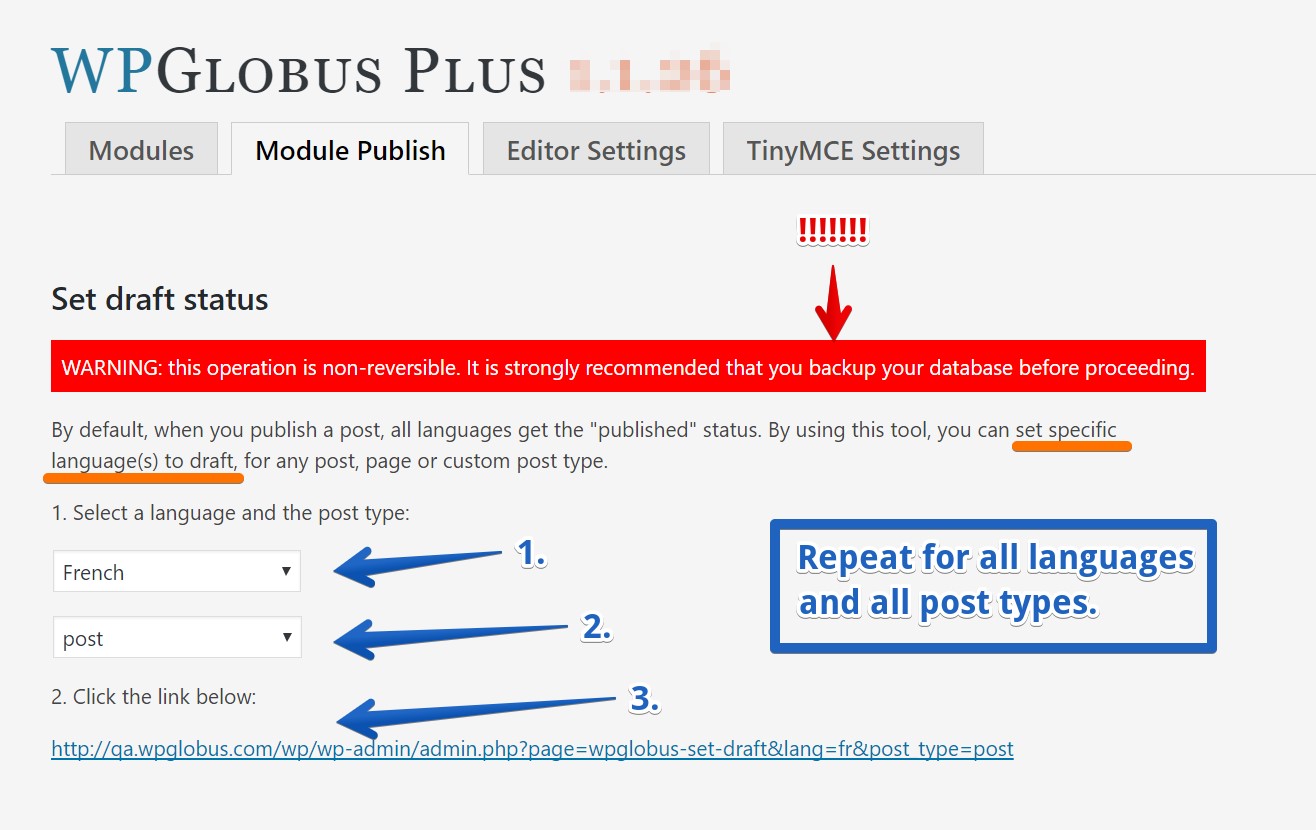
Make sure you have a backup of your site. Incorrect usage would cause the entire site to become «404»!
Follow the simple steps:
- Choose the language
- Choose the post type (post, page, etc.)
- Click the link
- Repeat for other post types and languages.